April 30th saw the ending of a chapter in my life. For the past seven years I had a part-time job as Administrative Assistant at one of our local United Methodist churches, but due to lack of funding, I was laid off. May 1st brought about many changes, one of which was becoming accostumed to working at home. Though I had a part-time job, I also have my own business as a Virtual Assistant. I may not be bursting at the seams with clients, but I do have a few partnerships that I have developed over the years and clients who reach out to me for project work or administrative duties. I have also just taken on another endeavor: taking my administrative skills to the next level by becoming a Super VA (a super Virtual Assistant). I'm currently learning new technical skills that will allow me to offer more to my current clients and the new clients I hope to engage in the future.
But truth be told, the one blessing I cherish the most in this transition is having time to spend in prayer, and being creative. The former is very important to me for my creative juices flow from my time of prayer and reflection. It is my hope that I will be blogging and sharing more as I become comfortable with my new status, but more than that, I am looking forward to sharing what the Lord is placing on my heart to share with you. My prayer has been for the Lord to use me to do His will and I'm looking forward to His word flowing through me to you.
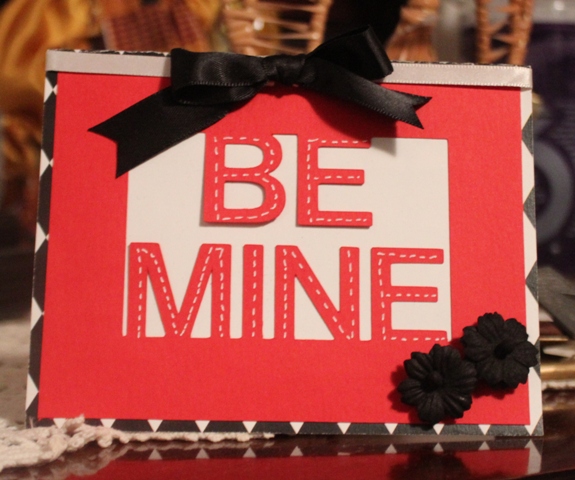
As I usually do, here are a few photos of some of my cards and art work I've made since my last posting.
Showing posts with label Digi files. Show all posts
Friday, June 17, 2016
Wednesday, March 20, 2013
Just Being Creative
There's one thing I love more than paper crafting and that is playing with graphic images. It's a plus for me when I can combine the two. The following cards were made using both of these forms.
First, I created a card for a friend who wanted to thank the DJ that played at her husband's birthday party. In trying to find something that fit the occasion, I used the "Lil DJ" digi by Robert Jackson and using Gimp, combined it with a background image I had in my stock collection. Prior to adding the digi to the image, I made it a png file, so the transparent file would blend in with the background image. I then made a tag in Word and cut / paste it to the front of the card. This is the final product.
This next card was for my sister's boss. Her boss loves to dance and since I didn't have an image she liked, she asked me to use a shoe as the theme. Again, I went into my stash of digi files and found a shoe I had used on the left. Again, using Gimp, I first filled the black shoe with the leopard pattern. I then cleaned up the image so that the spots that are highlighted in the black shoe were completely filled with the pattern. I also made the image transparent (png), which would allow me to place it on a background and not have an overlap with the white background jpeg files have. Once done, I found a background that would highlight the shoe. My idea was a stage light theme. I found the right image, though the original color was blue. My sister's boss loves green (so do I BTW), so opening the image in Word, I recolored the background in green, added a border, and using Word Art, created the sentiments on the front of the card. I placed the shoe image on the background and then copied/pasted another copy with the same dimensions and printed it all on white card stock. I paper pierced the extra image of the shoe that I printed out and stacked it over the printed image with sticky dots that would allow the shoe to "pop out" from the background image. I finished by embellishing the card with buttons and twine to match the color of the card stock and green background, then used Stickles to add some dimension and bling to the words and image. Hope you like it.
First, I created a card for a friend who wanted to thank the DJ that played at her husband's birthday party. In trying to find something that fit the occasion, I used the "Lil DJ" digi by Robert Jackson and using Gimp, combined it with a background image I had in my stock collection. Prior to adding the digi to the image, I made it a png file, so the transparent file would blend in with the background image. I then made a tag in Word and cut / paste it to the front of the card. This is the final product.
This next card was for my sister's boss. Her boss loves to dance and since I didn't have an image she liked, she asked me to use a shoe as the theme. Again, I went into my stash of digi files and found a shoe I had used on the left. Again, using Gimp, I first filled the black shoe with the leopard pattern. I then cleaned up the image so that the spots that are highlighted in the black shoe were completely filled with the pattern. I also made the image transparent (png), which would allow me to place it on a background and not have an overlap with the white background jpeg files have. Once done, I found a background that would highlight the shoe. My idea was a stage light theme. I found the right image, though the original color was blue. My sister's boss loves green (so do I BTW), so opening the image in Word, I recolored the background in green, added a border, and using Word Art, created the sentiments on the front of the card. I placed the shoe image on the background and then copied/pasted another copy with the same dimensions and printed it all on white card stock. I paper pierced the extra image of the shoe that I printed out and stacked it over the printed image with sticky dots that would allow the shoe to "pop out" from the background image. I finished by embellishing the card with buttons and twine to match the color of the card stock and green background, then used Stickles to add some dimension and bling to the words and image. Hope you like it. Thursday, February 28, 2013
Post Valentine
Yes, I know, Valentine's Day is long past, however, since we're still in February I think it's not too late to post cards, what do you say?
I made these cards a while back, however, because I've been super busy, I wasn't able to post them to my site, so for your viewing pleasure, here they are:
I made this card especially for someone who wanted to give it to their hubby. Drawing inspiration from here and using the sketch on the left, this is what I came up with. The background papers we digi papers purchased from Mygrafico. The papers are by Cupcake Cutiees and they're called Hearts N Love papers. The Love of My Heart sentiment was printed on Gina K Designs Red Hot and Dark Chocolate cardstock from my computer using the Channel font, and I finished by embellishing with brown ribbons and two pearl pins to which I added tiny pearls at the end so they won't stick anyone, lol! The card on the right (below) was made using the same papers, but the embellishments were from my stash. I made this one for my brother to give to his wife. I love the play of red and chocolate, don't you?

These other cards were quickies made using cutting files I purchased from the Cutting Café. They were easy to make using Make-the-Cut. These are the finished products. Most of the papers I used were part of a stash I've had sitting around for a long time.
I made these cards a while back, however, because I've been super busy, I wasn't able to post them to my site, so for your viewing pleasure, here they are:
I made this card especially for someone who wanted to give it to their hubby. Drawing inspiration from here and using the sketch on the left, this is what I came up with. The background papers we digi papers purchased from Mygrafico. The papers are by Cupcake Cutiees and they're called Hearts N Love papers. The Love of My Heart sentiment was printed on Gina K Designs Red Hot and Dark Chocolate cardstock from my computer using the Channel font, and I finished by embellishing with brown ribbons and two pearl pins to which I added tiny pearls at the end so they won't stick anyone, lol! The card on the right (below) was made using the same papers, but the embellishments were from my stash. I made this one for my brother to give to his wife. I love the play of red and chocolate, don't you?

These other cards were quickies made using cutting files I purchased from the Cutting Café. They were easy to make using Make-the-Cut. These are the finished products. Most of the papers I used were part of a stash I've had sitting around for a long time.
Subscribe to:
Posts (Atom)